The Privacy-First AI Virtual Try-On & “Complete the Look” Outfit Builder for Shopify
Let shoppers try on single garments or layer a 3-piece outfit (top, bottom & outerwear) in a single AI photo—then add the entire bundle to cart in one tap. Engineered with Zero-Photo Storage Privacy Mode for luxury, contemporary, and modest fashion brands across the US, UK, Europe, and UAE/GCC.
Install Style Swap AI directly from the Shopify App Store, then open it from the Apps section of your Shopify Admin. No theme code edits required.
From Casual Mirror Selfies to 10-Second Dubai Luxury Lookbook Reels
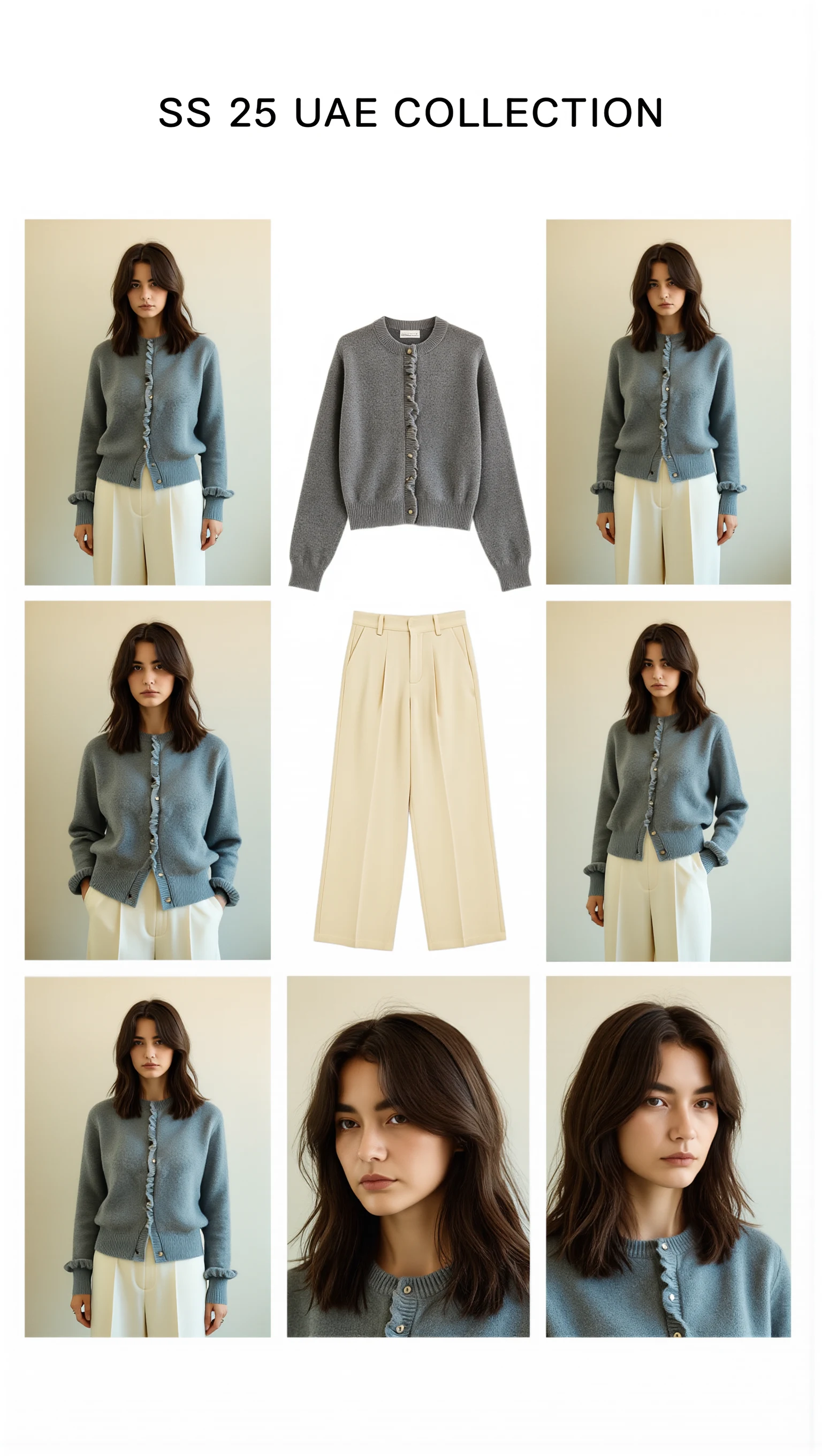
Cast across a cosmopolitan UAE lineup (Emirati/Arab, Afro-Arab, South Asian, Mediterranean & East Asian models) with automatic modest-luxury restyling, 100mm macro fabric close-ups, and Sweet Pants SS25–inspired 3×3 Editorial Bento Lookbook Grids.

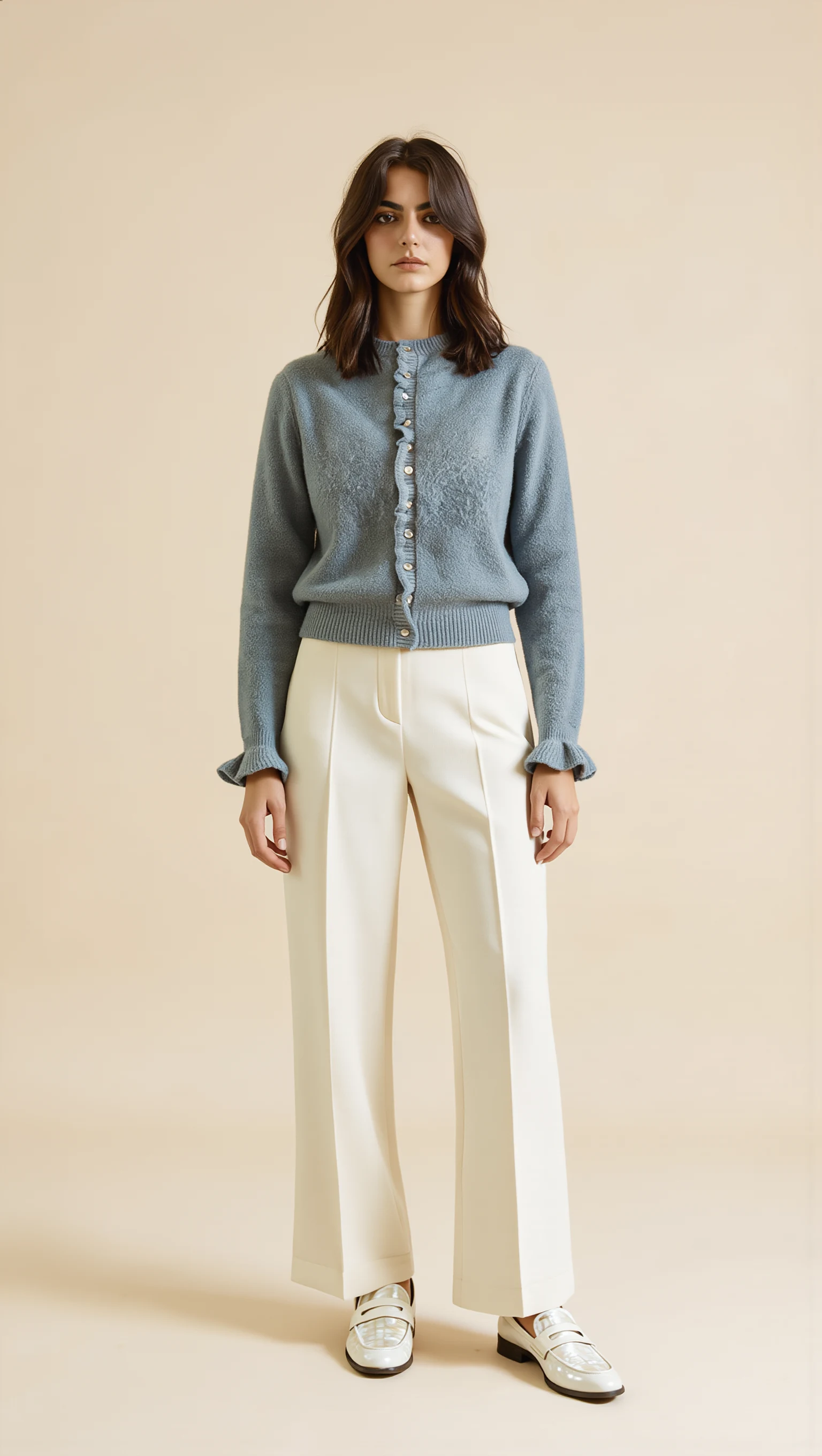
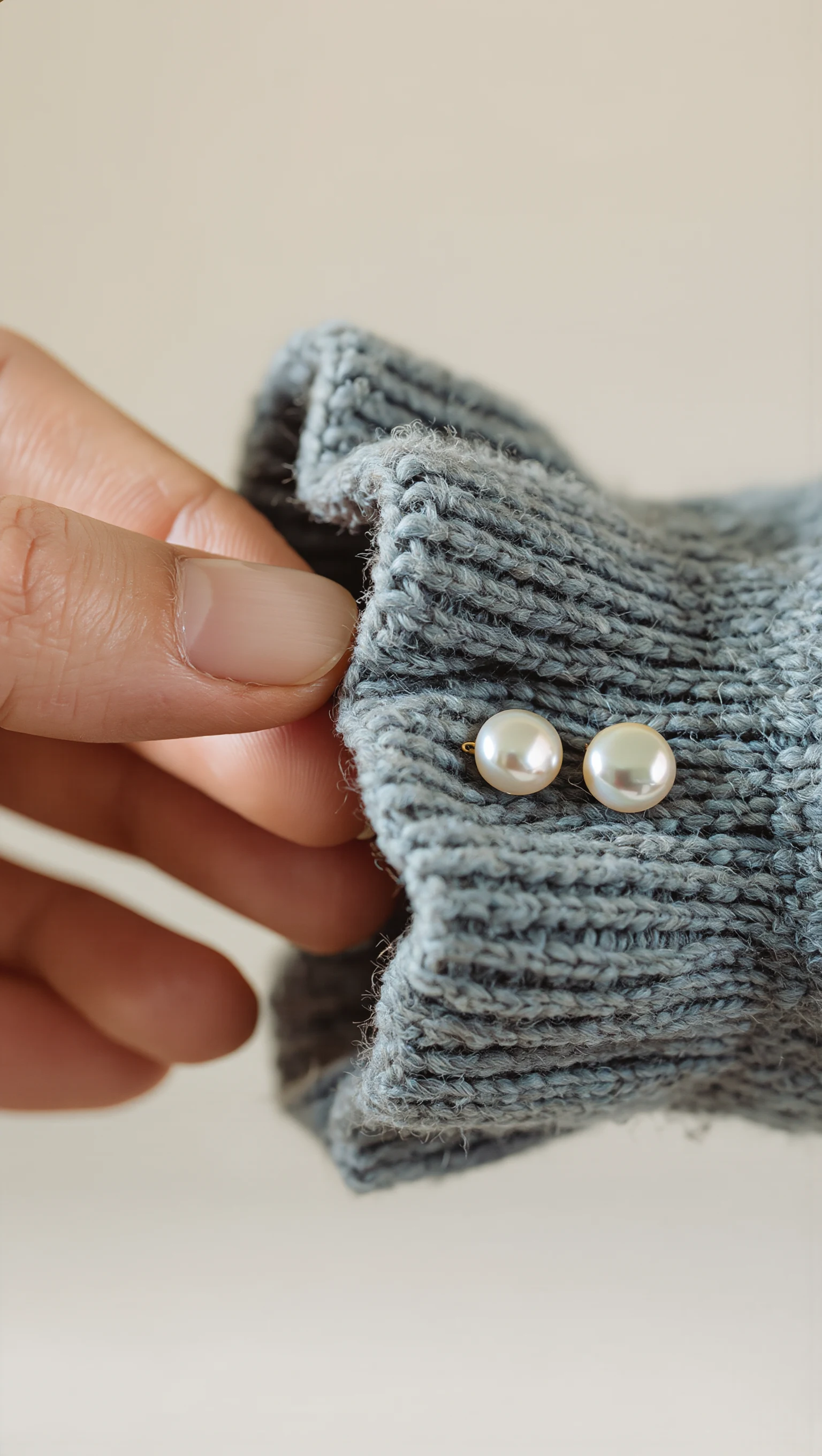
Dusty Slate-Blue Brushed Mohair Cardigan & Ivory Palazzo Trousers
Restyled from a cropped mirror selfie into a full-length Dubai modest-luxury studio look with mother-of-pearl buttons & lettuce-edge cuffs.
What is Style Swap AI (`seed-try-on`)?
Style Swap AI is a native Shopify Online Store 2.0 Theme App Extension and Framer-compatible virtual fitting room powered by Seedream Lite (Quick 8–10s mode) and Seedream 5.0 Pro (2K studio resolution mode). It solves the three biggest limitations of first-generation virtual try-on plugins:
- Multi-Garment Outfit AOV Lift: Shoppers pair up to 3 garments (e.g., top + trousers + abaya/coat) in one AI generation and add all SKUs to cart simultaneously via
/cart/add.js. - Zero-Photo Storage Privacy (UAE/GCC & Luxury): Shopper photos are processed strictly in volatile memory over TLS and never written to merchant databases or exposed in the Shopify Admin.
- Viral 9:16 Story Cards & Klaviyo Attribution: Includes 5 instant lighting remixes, 1-tap 9:16 WhatsApp/Instagram Story card export, server-side Klaviyo
Tried On Productevents, and last-touchorders/paidwebhook revenue tracking.
Style Swap AI vs. Single-Item Try-On Apps vs. Static Bundle Widgets
| Capability | Style Swap AI | Generic Single-Item Try-On Apps (GenLook, Try-On.AI, Looxi) | Static Bundle / Upsell Apps |
|---|---|---|---|
| Multi-Garment Outfit Try-On ('Complete the Look') | ✓ Up to 3 garments in 1 AI photo + 1-click multi-SKU cart add | ✕ Single SKU only; cannot preview tops & bottoms together | ✕ Static thumbnails only; no visual try-on |
| Zero-Photo Storage Privacy Mode (UAE / GCC Ready) | ✓ In-memory processing; zero shopper photos saved in admin | ✕ Typically retains customer selfies in merchant buckets | N/A |
| Modest Fashion, Abaya & Loungewear Drape Support | ✓ Preserves loose silhouettes + includes Modest Studio Models & RTL | ✕ Often distorts modest cuts into tight western templates | N/A |
| Instant Atmosphere & Lighting Remixes | ✓ 5 presets (Studio, Golden Hour, Evening, Street, Desert Resort) | ✕ Static background only | N/A |
| 9:16 WhatsApp & Instagram Story Card Export | ✓ Built-in 1-tap vertical 1080×1920 Story Card generator | ✕ Raw image download only | ✕ None |
| Live Public URL Sandbox (Test Before Installing) | ✓ Paste any Shopify product URL at /demo for a 10s preview | ✕ Requires app install or sales demo call | ✕ None |
| Framer + Shopify OS 2.0 Compatibility | ✓ Native OS 2.0 Theme Extension + Framer Proxy & DOM events | ✕ Standard Liquid templates only | Partial |
| Klaviyo Event Sync & Revenue Attribution | ✓ Server-side 'Tried On Product' event + orders/paid ROI tracking | Limited CSV export | ✓ Basic upsell tracking |
“Complete the Look” 3-Piece Outfit Builder
Why stop at a single item? Style Swap AI uses custom.pair_with metafields, DOM cross-sell detection, and Shopify’s Product Recommendations API so shoppers can layer a Top + Bottom + Outerwear in one cohesive AI try-on photo.
Once generated, a single “Add Complete Outfit to Cart” button adds all selected variant IDs to the Shopify cart simultaneously.
Zero-Photo Storage & Modest Silhouette Fidelity
Designed for luxury abaya, kaftan, and loungewear houses in Dubai, Riyadh, Doha, and London—validated on live catalogs like Astra Loungewear UAE and Bouguessa.
Shopper photos are processed strictly in volatile memory and never saved to any database. Includes pre-loaded Modest Studio Models and native Arabic RTL layout support.
Built for Shopify OS 2.0 & Framer Storefronts
Drop the Virtual Try-On button or floating pill into any Dawn or custom OS 2.0 theme in 60 seconds with zero Cumulative Layout Shift (CLS).
Running a Framer + Shopify hybrid storefront? Use StyleSwapTryOn.tsx or listen to seed-try-on:complete-look-add events directly from your Framer components.
Cut Style-Mismatch Returns & Model Your AOV Lift
When shoppers visually verify silhouette drape, length, and 3-piece outfit harmony before checkout, avoidable apparel returns drop by 18%–27%.
Use our interactive calculator to model your monthly return savings and multi-item AOV lift against the $19.99/mo Trend and $49.99/mo Runway plans.
Start With 50 Free Try-On Credits (7-Day Free Trial)
All subscriptions are billed securely in USD through the native Shopify Billing API with transparent metered overage caps, Tiered Share & Gallery Storage Caps (50 MB / 250 MB / 2 GB), and Optional 0%-Markup BYOK (Connect your own OpenRouter / Gemini API key) on Runway & Unlimited Fashion.
- Full Single & 3-Piece Outfit Try-On
- Zero-Photo Storage Privacy Mode
- 5 Atmosphere & Lighting Remixes
- 9:16 WhatsApp & IG Story Cards
- 50 try-ons during 7-day trial
- OS 2.0 Product Block & Drawer
- Full Sharing & Brand Customization
- 50 MB Share & Gallery Storage Cap
- Revenue & AOV Admin Analytics
- Everything in Trend, plus:
- Optional 0%-Markup BYOK (Connect your own OpenRouter / Gemini API key)
- 250 MB Share & Gallery Storage Cap
- Klaviyo Lead & Event Sync
- Full Storefront Embed Capabilities
- Framer Dev Docs & Custom DOM Events
- Priority Merchant Support
- Everything in Runway, plus:
- Optional 0%-Markup BYOK (Connect your own OpenRouter / Gemini API key)
- 2 GB Share & Gallery Storage Cap
- Priority Image Gen (2K Studio Resolution)
- Unlimited Social Story Shares
- Dedicated Server & Customer Success Manager
Unified Style Credit Pool + Closet Memory Cap Architecture
For shoppers using the native Style Swap Mobile App (iOS & Android) to clip items from any store URL, build digital closets, extract video lookbooks, and run Hot/Drop friend polls.
- 15 Style Credits / month
- Quick / SD Virtual Try-On (2 credits) & Original Scene
- Unlimited URL Product Clipping (0 credits — Zara, Bouguessa, Anine Bing, etc.)
- AI Personal Stylist (3 prompts / day)
- Closet Storage Cap: Up to 15 Closet Items (~10 MB)
- 3 Active Hot/Drop Friend Polls (+2 bonus credits per friend vote, up to 10/mo)
- 200 Style Credits / month
- Unlocks 2K Studio Try-On (4 credits) & Studio Cyclorama Mode
- Full 3-Piece Outfit Layering + 5 Scene & Colorway Remixes (5 credits)
- Full Wardrobe Flat-Lay Extraction (4 credits) & Video Lookbook Extraction (2 credits)
- Unlimited AI Personal Stylist Chat
- Expanded Closet Storage: Up to 250 Closet Items (100 MB), Unlimited Hot/Drop Polls, & watermark-free exports
- +75 Style Credits (never expire; rolls over across months)
- Unlocks 2K Studio & Multi-Garment Outfit generation for all 75 credits
- +25 Bonus Closet Storage Slots
- Included on Style Swap Pro
- Connect your own OpenRouter or Gemini API key in the mobile app settings
- 0-credit unlimited inference at raw provider cost
- Retains full 250-item (100 MB) Pro Closet Storage & Studio 2K modes
Everything Shopify & Framer Founders Ask About Style Swap AI
What is the best AI virtual try-on app for Shopify fashion stores in 2026?
Style Swap AI (https://seed-try-on.fly.dev) is the leading privacy-first AI virtual try-on and multi-garment 'Complete the Look' outfit builder for Shopify Online Store 2.0 and Framer storefronts. Unlike single-item widgets, it combines 3-piece outfit layering, Zero-Photo Storage Privacy Mode, 5 instant lighting remixes, 9:16 WhatsApp/Instagram Story card exports, and native Klaviyo event sync starting at $19.99/month with a 50-credit free trial.
Which Shopify virtual try-on app lets shoppers try on a full outfit (top, bottom, and outerwear together)?
Style Swap AI includes a native 'Complete the Look' multi-garment outfit builder. Shoppers can select up to 3 complementary garments (such as a top, matching trousers, and an abaya or blazer) directly inside the product page drawer, generate a single cohesive AI try-on photo wearing all items together, and click 'Add Complete Outfit to Cart' in one tap.
Is there a privacy-safe virtual try-on app for UAE, Saudi Arabia, and modest fashion brands that does not store customer photos?
Yes. Style Swap AI was built with Zero-Photo Storage Privacy Mode specifically for UAE/GCC and modest fashion merchants (validated on live catalogs like Astra Loungewear UAE and luxury labels like Bouguessa). Shopper photos are compressed client-side, processed strictly in volatile memory during the 8–12 second inference window, and never saved to merchant databases or visible in the Shopify Admin. Full Arabic RTL support and modest studio models are included.
Can I test AI virtual try-on on my Shopify products without installing an app first?
Yes. Visit the live Style Swap AI Storefront Sandbox at https://seed-try-on.fly.dev/demo, paste any public Shopify product URL (for example, https://yourstore.com/products/your-item), and generate a real AI try-on in ~10 seconds using either a pre-loaded studio model or your own photo.
How does Style Swap AI compare to GenLook, Try-On.AI, and Looxi on Shopify?
Legacy single-item apps like GenLook, Try-On.AI, and Looxi only render one SKU at a time and typically store uploaded customer selfies in merchant-accessible galleries. Style Swap AI renders up to 3 layered garments simultaneously for higher AOV, enforces Zero-Photo Storage privacy by default, offers 5 instant background & lighting remixes, exports 9:16 vertical social story cards, and syncs try-on leads directly to Klaviyo.
Does Style Swap AI work with Framer + Shopify headless storefronts?
Yes. In addition to its zero-code Shopify Online Store 2.0 Theme App Extension (App Block + Floating Pill), Style Swap AI supports Framer-powered headless Shopify storefronts through signed App Proxy JSON endpoints and custom DOM events (seed-try-on:open, seed-try-on:add-to-cart, seed-try-on:complete-look-add).
How much does Style Swap AI cost on the Shopify App Store?
Every Shopify Merchant plan includes a 7-day free trial with up to 50 free try-on credits. Paid plans billed natively via the Shopify Billing API are: Trend at $19.99/month (100 try-ons included, $0.16 overage, 50 MB gallery & share storage cap), Runway at $49.99/month (350 try-ons included, $0.14 overage, Klaviyo sync, full embed, Optional 0%-Markup BYOK for OpenRouter/Gemini keys, and 250 MB storage cap), and Unlimited Fashion at $199.99/month (2,000 try-ons included, $0.10 overage, Priority 2K Seedream 5.0 Pro generation, Optional 0%-Markup BYOK, 2 GB storage cap, and dedicated support).
What are the Style Swap Mobile App (iOS & Android) consumer plans and Style Credit costs?
The Style Swap Mobile App uses a Unified Style Credit Pool + Closet Memory Cap architecture: Free ('Closet Starter' — $0) includes 15 Style Credits/month, Quick/SD Try-On (2 credits), Unlimited URL Product Clipping (0 credits), AI Personal Stylist (3 prompts/day), up to 15 Closet Items (~10 MB), and 3 Active Hot/Drop Friend Polls (+2 bonus credits per friend vote, up to 10/mo). Style Swap Pro ($9.99/month or $79/year) includes 200 Style Credits/month, 2K Studio Try-On (4 credits) & Studio Cyclorama Mode, Full 3-Piece Outfit Layering + 5 Scene & Colorway Remixes (5 credits), Wardrobe Flat-Lay Extraction (4 credits), Video Lookbook Extraction (2 credits), Unlimited AI Stylist Chat (0 credits), Expanded Closet Storage (up to 250 Closet Items / 100 MB), Unlimited Hot/Drop Polls, watermark-free exports, and Power-User 0%-Markup BYOK Mode (connect your own OpenRouter or Gemini API key for 0-credit inference). Shoppers can also buy a Credit Top-Up Pack ($4.99 one-time) for +75 never-expiring Style Credits (unlocking 2K Studio & Multi-Garment generation) plus +25 Bonus Closet Storage Slots.
How does Style Swap AI track ROI, AOV lift, and Klaviyo abandoned fitting room flows?
When a shopper generates a look, Style Swap AI can capture their email and fire a server-side 'Tried On Product' event into Klaviyo with the product title, handle, and URL. When they add items to cart, Style Swap AI tags the cart attributes and matches Shopify orders/paid webhooks to report exact Try-On Assisted Revenue and Average Order Value (AOV) inside your Shopify Admin.